IPTV Service: What a Good One Does After You Subscribe
An IPTV service is more than a channel list. It is the activation, the upkeep, the TV guide, the evenings that hold and the person who answers. This guide shows what to expect from each.
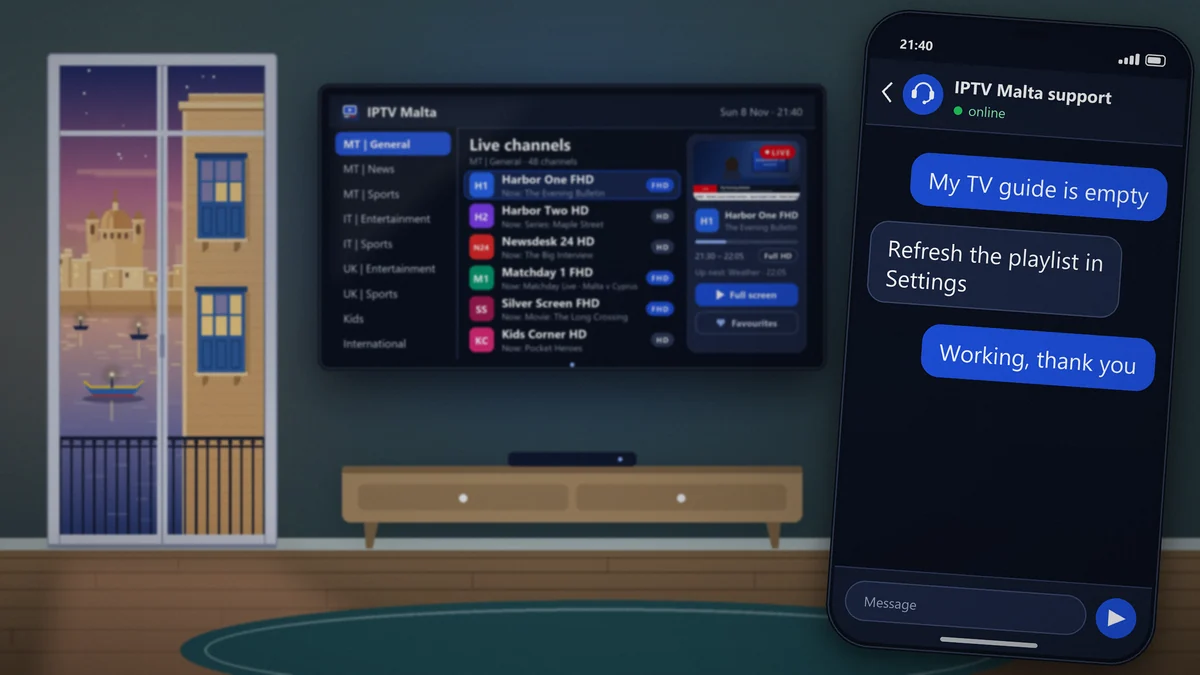
Two offers can list the same channels at the same price and feel completely different a month later. The difference is the IPTV service behind the list: how fast the account was opened, whether the TV guide is filled in, what happens when a channel drops at 21:00, and whether anyone replies when you write.
None of that appears on a sales page, which is why it is worth knowing what to look for. This guide goes through the six parts of an IPTV service, explains what good looks like for each, and gives a way to check it during a trial rather than after a year’s payment.
The plans themselves are described in the guide to the IPTV subscription. To judge the service directly, the 24-hour trial includes all of it, support included.
A good way to time the reply yourself.
1 hour free or 24 hours for €2.95.
What is an IPTV service?
An IPTV service is everything a provider does so that television arrives on your screen over the internet and keeps arriving. The channel list is the visible part. Underneath it sit servers, people who watch over the streams, a TV guide that has to be fed every day and a support desk.
It helps to separate three words that are often used as one:
| Word | What it is | What you check |
|---|---|---|
| Subscription | The access you pay for | Length, screens, price |
| Stream | The video as it travels | Picture, stability, speed |
| Service | The work around both | Activation, upkeep, support |
You can compare subscriptions on a price list and streams with a stopwatch. A service only shows itself over time, or during a trial used with the right questions in mind.
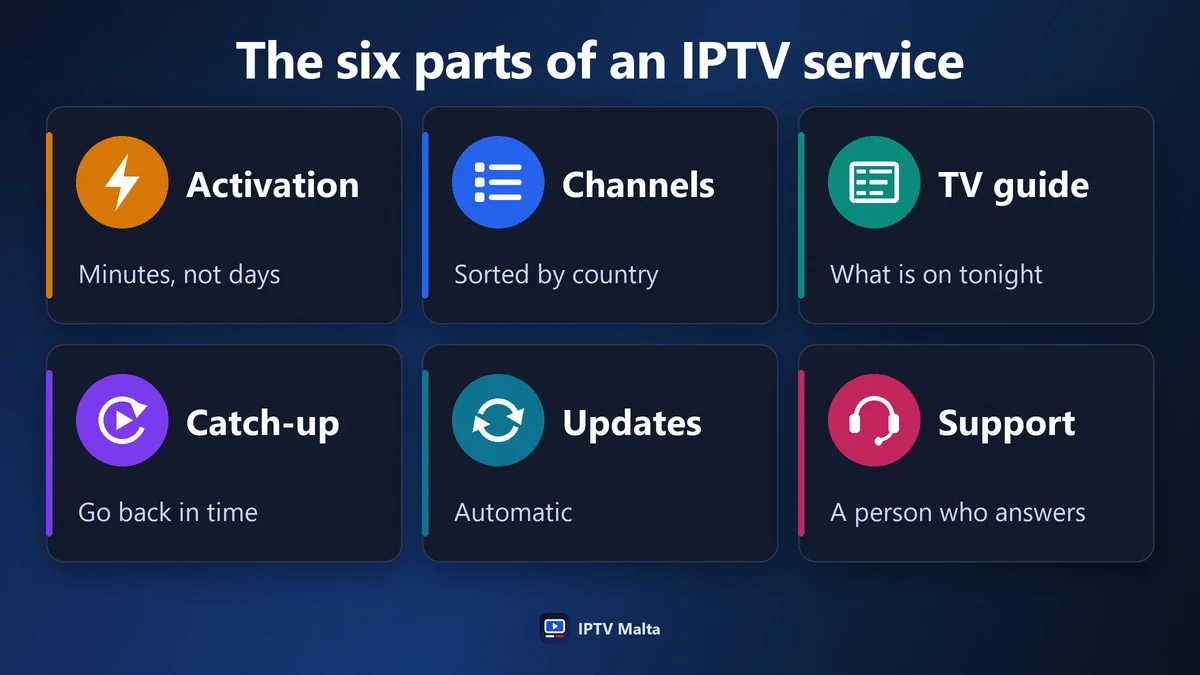
The six parts of a good IPTV service
Each of these is the subject of a section below. In brief:
- Activation: the account is opened in minutes, at any hour.
- Channels: complete, sorted, and repaired when one fails.
- TV guide: filled in for the channels you watch, on the right time zone.
- Catch-up: the ability to go back on live channels.
- Updates: new channels and titles appear without you doing anything.
- Support: a person who answers, quickly, when you are watching.
Uptime, the proportion of time the service is available, runs through all six. It gets a section of its own because it is the figure most often quoted and least often explained.
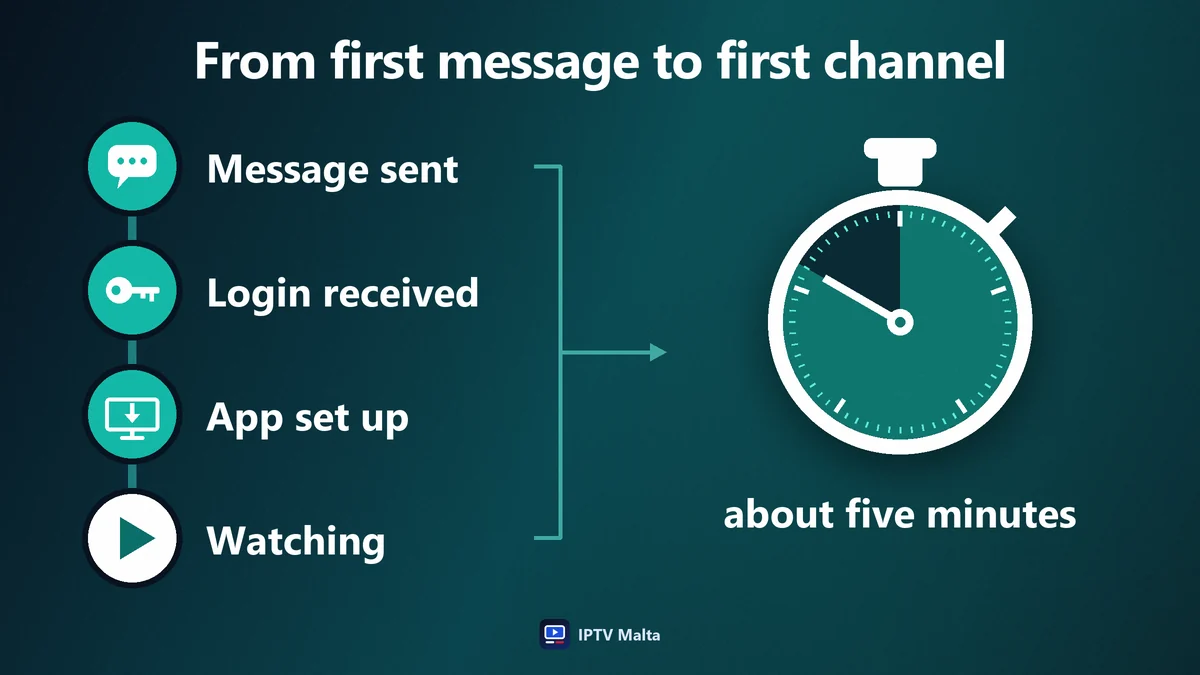
Activation: from first message to first channel
The first contact tells you a great deal about the months that follow. A service that takes a day to open an account will not be faster when something breaks.
What good looks like
You say which plan or trial you want and which device you use. You receive your login details within minutes. If the app needs a MAC address and a device key, you are told where to find them. The whole exchange fits in one short conversation.
The hour matters
People subscribe in the evening, often minutes before a match. Activation that only works in office hours misses the moment it is needed. Ours runs 24 hours a day.
Guided installation
If you have never installed a player, a technician stays with you step by step. The steps for each device are also written out in the installation guide.
Channels: a list that is looked after
A channel list is not built once and left alone. Sources change, streams fail, new channels launch. Upkeep is most of the work, and it is invisible when it is done well.
Sorted, not dumped
With 34,000+ channels, order is everything. Each country has its own groups by theme, so that the Maltese, Italian and UK channels you watch are three clicks away rather than lost in a list of thousands.
Several versions of the main channels
Full HD, HD and SD versions sit side by side. When your connection is weak, or one version has a problem, you switch to another instead of waiting.
Repaired quickly
When a channel’s source fails, a good service notices and replaces it without being asked. When it has not noticed, a message from you should be enough, and the fix should take minutes, not days.
Named so that you can find them
It sounds trivial and it is not. A channel that appears under three slightly different names, or under a code, cannot be found by search and cannot be added to favourites with confidence. A list where every channel has one clear name, its quality marked beside it and its place in the right group is the visible sign that someone looks after it every day.
The TV guide: the part that makes a list usable
Without a TV guide, known as the EPG, a channel is a name and nothing else. With it, you see what is on now, what follows and what is on tonight, exactly as on a conventional set-top box.
- Coverage: the guide should be filled in for the channels you actually watch, not only for the biggest ones.
- Time zone: programmes should appear at Malta time, without mental arithmetic.
- Freshness: it should reach several days ahead and update by itself.
It is one of the easiest things to check in a trial: open the guide on five channels you know and compare with what is really on.
Catch-up and the on-demand library
Live television is only half of a modern service.
Catch-up
On channels that support it, you can restart a programme that has begun, pause the live picture or go back to a goal. It turns “I missed the start” into a non-event.
The library
More than 90,000 movies and series are included, sorted by genre, with complete series season by season. New titles are added every day. Nothing is rented and nothing is charged per film.
Updates without effort
New channels and titles appear in the app by themselves. You never reinstall anything or request a new list.
Uptime: what the figure really means
Uptime is the share of time a service is available. The figure sounds abstract until it is turned into hours.
| Uptime | Unavailable per month | Unavailable per year |
|---|---|---|
| 99% | About 7 hours | More than 3 days |
| 99.5% | About 3.5 hours | Nearly 2 days |
| 99.9% | About 45 minutes | Under 9 hours |
We aim for 99.9%, on redundant servers in Europe: if one machine fails or fills up, the others take over. No honest provider promises 100%, because networks outside anyone’s control sometimes fail.
The average hides the evening
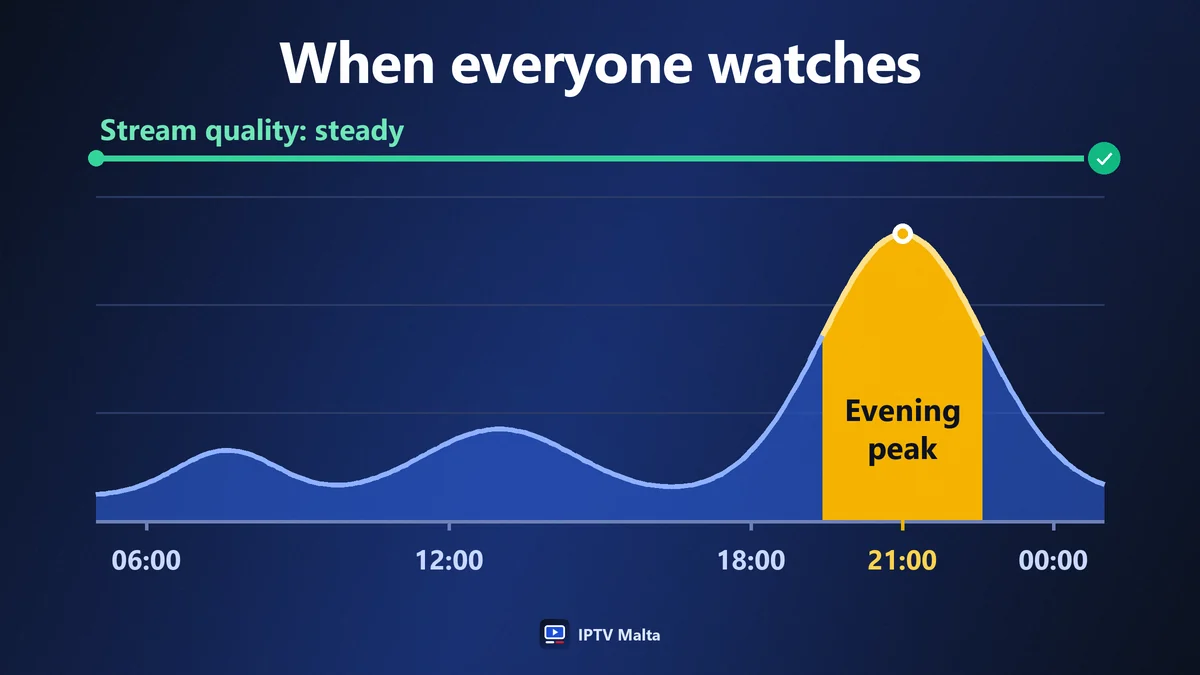
An outage at 04:00 costs nobody anything. Forty minutes at 21:00 on the night of a final is all anyone remembers. What you need to know is how a service behaves at peak time, and only an evening test tells you.
Support: the part you notice most
You will rarely need support. When you do, it will be in the evening, with guests in the room, and the quality of the answer will shape your opinion of everything else.
A person, not a form
A direct conversation solves in three messages what a ticket system solves in three days. Ours is on WhatsApp, in English.
Open when you watch
Evenings and weekends are when television is on. Support has to be there then: 24 hours a day, seven days a week.
Someone who can act
The person who answers should be able to see your account, move it to a new device, check a channel and say what is happening, without passing you on.
| Your request | What a good service does | How long it should take |
|---|---|---|
| “One channel does not open” | Checks it and switches the source | Minutes |
| “I changed my TV” | Moves the account to the new device | Minutes |
| “The TV guide is empty” | Explains the refresh, or fixes the feed | Minutes |
| “The picture freezes” | Helps you find whether it is the line or the stream | One conversation |
| “I want to renew” | Extends the same account, same login | Minutes |
Reply in English, 24 hours a day.
A service that follows your devices
A service worth the name works on what you already own: Samsung and LG Smart TVs, Android TV and Google TV, Android and MAG boxes, Fire TV Stick, Apple TV, iPhone, iPad, Windows and Mac.
It also adapts when your equipment changes. A new television, a stick taken on holiday, a second home in Gozo: the account moves with you, and changing device costs nothing. If you prefer another player, the line is supplied as an M3U link or an Xtream Codes login.
After the sale: renewal and follow-up
How a service treats you at the end of a period says as much as how it treated you at the start.
- No automatic renewal. The access ends on its date and nothing is charged.
- The same login details after a renewal: nothing to retype, nothing to reinstall.
- A plan you can change: another length, more screens or fewer.
- A written refund policy: 7 days on a new subscription, under the conditions of the refund policy.
These points are worth reading before you pay. A service that is clear about how to leave is usually a service you will not want to leave.
No contract, from €3.96 a month.
How to test an IPTV service in one evening
A 24-hour trial is enough to check all six parts, provided you use it in the evening and in this order.
Step 1: time the activation
Note the minute you send your first message and the minute a channel is playing. That interval is your first measurement.
Step 2: open your own channels
Not the ones on the advert: the five or six you watch every week. Check that each exists, in which qualities, and that it opens quickly.
Step 3: watch at peak time
Put on a live match or the main evening programme between 20:00 and 23:00 and leave it running for an hour.
Step 4: write to support
Ask a real question, late in the evening. The time and the quality of the reply are the best forecast you will get.
A fuller comparison method, with a scorecard, is in the guide to the best IPTV.
Your first week with an IPTV service
The first days set the habits. A good service helps with each of them, and most take a minute.
Day one: favourites
Add the channels you watch every day to your favourites. From then on the app opens on a short list of your own instead of thousands of channels.
Day two: the second device
Install the app on a phone or a tablet as well. It is the quickest way to check, later, whether a problem comes from one device or from the line.
The first match night
Watch a full live event at peak time on your main television. If the picture pauses, this is the moment to write to support and sort out the connection, while the trial or the first month is still running.
End of the week: the plan
By now you know whether one screen is enough. If two programmes collided more than once, note it for the renewal.
An IPTV service for the whole household
A service is used by several people with different habits, and the details that suit a family are easy to overlook when one person does the choosing.
- Channels by country, so that the person who watches Italian television and the person who watches British series each find their group at once.
- A kids group kept apart from the rest, with cartoons and family films.
- Parental controls in the app settings, to keep some categories behind a code.
- Subtitles and audio choices in the library, where a title offers them.
- Several screens when two people watch at the same time every evening.
During a trial, hand the remote to everyone at home for ten minutes each. Their questions are the ones you will be asked for the rest of the year.
An IPTV service that travels with you
Because the account is a login rather than a box, the service is not tied to one address. That changes more than it seems to at first.
A Fire TV Stick in a suitcase brings your channels to a hotel room or a relative’s house. A second home in Gozo needs no second contract. Maltese living abroad keep the local channels on Malta time, and residents from other countries keep their own. A VPN can be used if a network filters streams.
The only requirement is a connection fast enough: 10 Mbps for HD, 15 Mbps for Full HD, for each screen playing.
Questions to ask an IPTV service before subscribing
Five questions cover the six parts. The speed of the reply is itself the answer to the sixth.
- How long does activation take, and at what hours?
- Is the TV guide filled in for the channels I watch? Name them.
- Which channels have catch-up?
- What happens when a channel fails? Who repairs it, and how fast?
- How do I move the account to another device?
A service that knows its own work answers in a few lines. One that replies with a price list has told you what it thinks the service is.
Signs of a poor IPTV service
They usually appear in the first week.
- Login details that arrive the next day.
- A TV guide that is empty on half the channels.
- Channels listed three times, with two of the three dead.
- Freezing every evening at the same hour.
- Messages left unanswered after the payment.
- A different explanation each time you ask.
One of these can be bad luck. Three together describe a service that will not improve. The questions that reveal them before you pay are in the guide to IPTV providers.
What depends on you, not on the service
Fairness requires saying it: part of the experience is decided in your own home.
- The connection at the television. A weak Wi-Fi signal freezes the best stream in the world.
- The device. An old stick struggles where a recent one does not.
- The plan. One screen in a household of four creates conflicts no provider can fix.
The checks for the first two are in the guide to the IPTV stream. A good service helps you run them instead of blaming your line, and a good customer runs them before blaming the service.
An IPTV service for Malta and Gozo
A service can be technically sound and still feel foreign. Four local points make the difference on the islands.
- Three complete groups. Maltese, Italian and UK channels each sorted by theme, because most households watch all three.
- The TV guide on Malta time. Programmes listed at the hour they start here, not an hour earlier or later.
- Support in English at local evening hours. An answer at 21:30 on a Saturday, not the following morning.
- Prices in euros. No conversion and no bank fee on a foreign currency.
The service works the same way in Gozo as in Malta: the only requirement is the connection. The local buying guide, with the other ways to watch television on the islands, is the IPTV subscription Malta guide.
The IPTV service checklist
Seven points to tick during a trial:
- The account was active within minutes.
- My usual channels are there, in Full HD or HD.
- The TV guide is filled in and on Malta time.
- Catch-up works on the channels I tried.
- A live programme held for an hour in the evening.
- Support answered a real question quickly.
- The renewal and refund terms are written down.
Seven ticks mean the service is doing its job. Anything less is worth a question before you subscribe.
Frequently asked questions
- What is an IPTV service?
- It is everything a provider does to deliver television over the internet: opening your account, maintaining the channels, feeding the TV guide, keeping the streams available and answering when you need help.
- How long does it take to activate an IPTV service?
- A few minutes after your request for a free trial, or after the payment is confirmed for a paid plan. Card, PayPal and Revolut are confirmed immediately; bank transfer and crypto within 2 to 3 hours.
- What does 99.9% uptime mean?
- That the service is unavailable for about 45 minutes a month at most, or under 9 hours a year. It is a target, not a guarantee of zero interruption, and what matters most is how the service behaves in the evening.
- Is support included in an IPTV service?
- Yes. Support on WhatsApp, in English, 24 hours a day, is part of every plan, as are help with installation and a change of device.
- Can I test an IPTV service before subscribing?
- Yes. A free 1-hour trial and a 24-hour trial for €2.95 give access to the full service, support included. Both are on the free trial page.
- What should I do if a channel stops working?
- Try the HD or SD version of the same channel, then report it to support with the channel name. A faulty source is normally replaced within the hour.